
Arch Linux package manager Pacman keeps it’s mirror list in /etc/pacman.d/mirrorlist
file. To change Pacman mirrors, you must modify this file. You can generate a mirrorlist
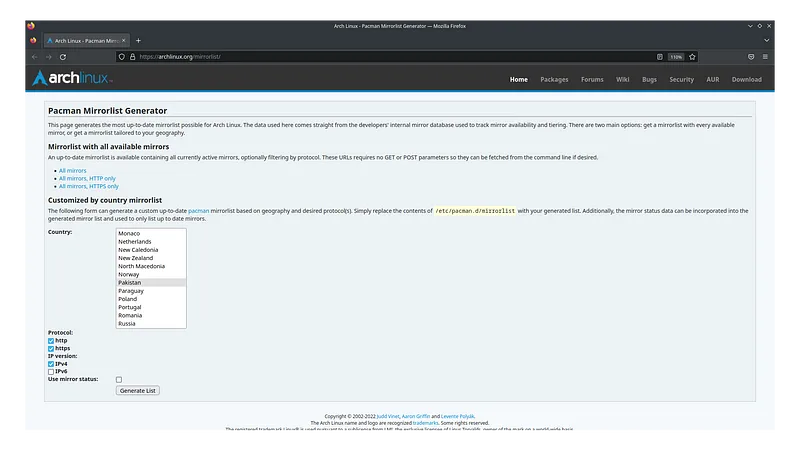
file for specific geographical location using the official Arch Linux website. Go to
www.archlinux.org/mirrorlist and
select your country along with the fields selected in the screenshot below.
This would get to a plain text web-page, that would contain the mirrorlist file.
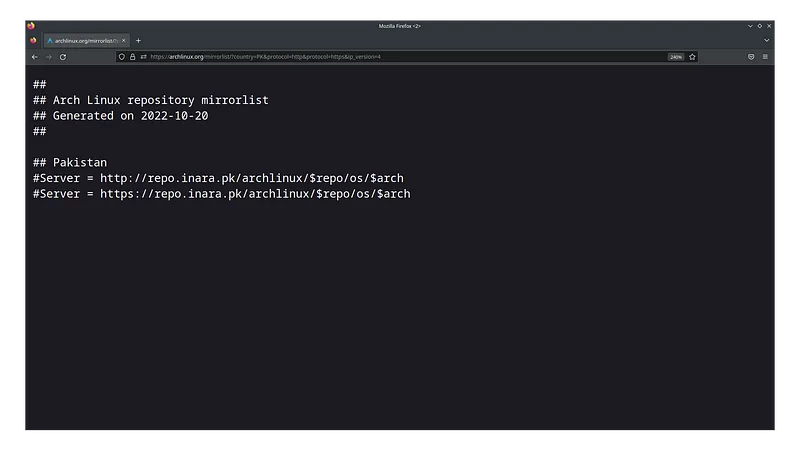
Copy the content into a file and remove the # before Server named mirrorlist.txt and
run the following commands.
sudo cp mirrorlist.txt /etc/pacman.d/mirrorlistThe file mirrorlist.txt has been copied to /etc/pacman.d/mirrorlist and needs to be
updated. Run following command to update pacman.
sudo pacman -SyyAfter this you may see an increase in the speed of pacman mirrors. If this does not work then get back to your previous mirrors.