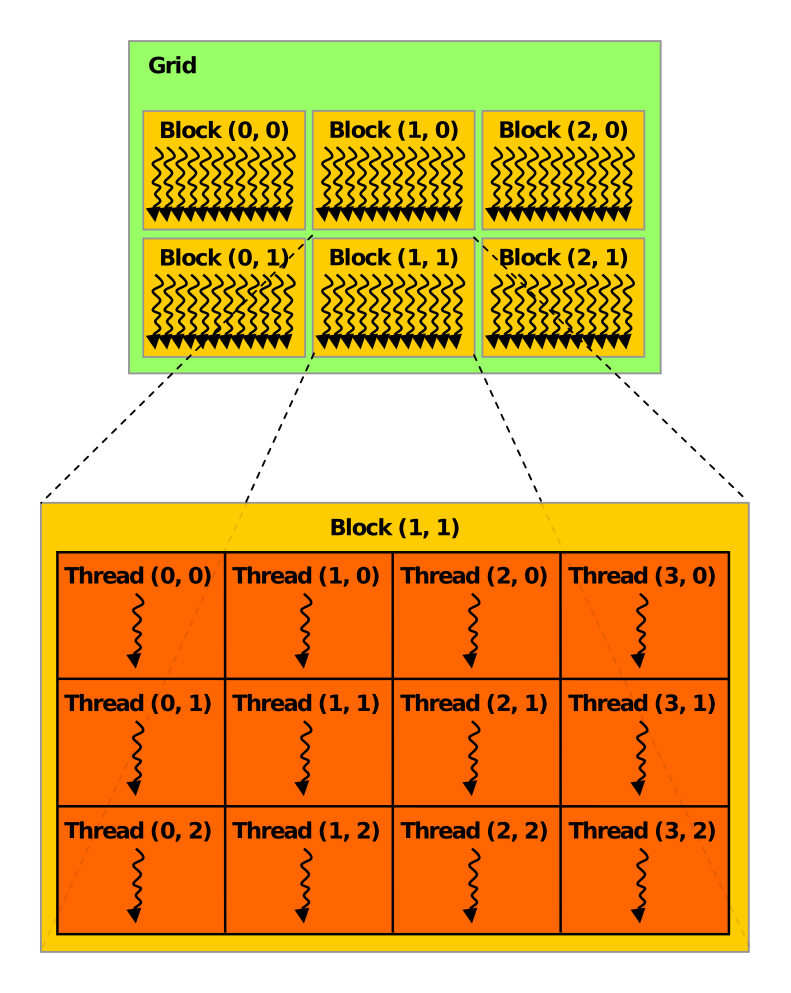
When a kernel function is moved to device and is executed a collection of threads are spawned which will perform the task provided by the kernel function. CUDA has a thread hierarchy which enables to organizing the threads. Its consist of two subtypes of hierarchy; block of threads and grid of blocks. All the threads are spawned simultaneously by the kernel launch are collectively called a grid. A grid is made of many thread blocks. A thread of block is a group that cooperate with each other using,
- Block Local Synchronization.
- Block Local Shared Memory.
[NOTE!] Threads from different blocks can not cooperate.
CUDA pre-initialize blockIdx and threadIdx to uniquely identify threads inside the kernel function. When a kernel is launched values are assigned to blockIdx and threadIdx by the CUDA runtime. These variables are of type uint3 which is a CUDA built-in type for vector of 3 integers. Its component are accessible through blockIdx.x, blockIdx.y and blockIdx.z and similarly threadIdx.x, threadIdx.y and threadIdx.z.
CUDA organizes grids and blocks in 3 dimensions. Their dimensions are defined by dim3 type. The dim3 type is a CUDA built-in type for 3D vector of unsigned integers. The dim3 type can be initialized with 1, 2 or 3 dimensions. For example, dim3 block(16){:.c} initializes a block of 16 threads in x dimension and 1 in y and z dimensions. Similarly, dim3 grid(4, 4) initializes a grid of 4 blocks in x and y dimensions and 1 in z dimension.
#include <cuda_runtime.h>
#include <stdio.h>
#include <stdlib.h>

__global__ void checkIndex(void) {
    printf(
        "threadIdx: (%d, %d, %d), blockIdx: (%d, %d, %d), blockDim: (%d, %d, %d), "
        "gridDim: (%d, %d, %d)\n",
        threadIdx.x, threadIdx.y, threadIdx.z, blockIdx.x, blockIdx.y, blockIdx.z,
        blockDim.x, blockDim.y, blockDim.z, gridDim.x, gridDim.y, gridDim.z);
}

int main() {
    const int nElem = 6;

    const dim3 block(3);
    const dim3 grid((nElem + block.x + 1) / block.x);

    printf("grid.x %d grid.y %d grid.z %d\n", grid.x, grid.y, grid.z);
    printf("block.x %d block.y %d block.z %d\n", block.x, block.y, block.z);

    checkIndex<<<grid, block>>>();

    cudaDeviceSynchronize();
    cudaDeviceReset();

    return EXIT_SUCCESS;
}code/2_GridBlock/CheckDimension.cu
>>> nvcc CheckDimension.cu -o CheckDimension
>>> ./CheckDimension
grid.x 3 grid.y 1 grid.z 1
block.x 3 block.y 1 block.z 1
threadIdx: (0, 0, 0), blockIdx: (0, 0, 0), blockDim: (3, 1, 1), gridDim: (3, 1, 1)
threadIdx: (1, 0, 0), blockIdx: (0, 0, 0), blockDim: (3, 1, 1), gridDim: (3, 1, 1)
threadIdx: (2, 0, 0), blockIdx: (0, 0, 0), blockDim: (3, 1, 1), gridDim: (3, 1, 1)
threadIdx: (0, 0, 0), blockIdx: (2, 0, 0), blockDim: (3, 1, 1), gridDim: (3, 1, 1)
threadIdx: (1, 0, 0), blockIdx: (2, 0, 0), blockDim: (3, 1, 1), gridDim: (3, 1, 1)
threadIdx: (2, 0, 0), blockIdx: (2, 0, 0), blockDim: (3, 1, 1), gridDim: (3, 1, 1)
threadIdx: (0, 0, 0), blockIdx: (1, 0, 0), blockDim: (3, 1, 1), gridDim: (3, 1, 1)
threadIdx: (1, 0, 0), blockIdx: (1, 0, 0), blockDim: (3, 1, 1), gridDim: (3, 1, 1)
threadIdx: (2, 0, 0), blockIdx: (1, 0, 0), blockDim: (3, 1, 1), gridDim: (3, 1, 1)For a given data size, the number of blocks and threads can be calculated using the following formula,
Where, is the number of grids, is the number of elements and is the number of blocks. This formula ensures that the number of blocks is rounded up to the nearest integer. The -1 is used to ensure that if there are any remaining elements, an additional block is created to handle them.
See more examples at Qazalbash/CUDAForge/code/2_GridBlock
Checkout Qazalbash/CUDAForge for more CUDA examples.